Zimbra Desktop 4.39.0
Calendar, notes, e-mail, and much more
What is Zimbra Desktop?
Zimbra Desktop is a desktop client for Mac that brings email, calendar, contacts, tasks and notes together in one application. It is aimed at people who want a single place to read mail and keep personal information organized without switching between several apps.
Best for: Mac users who want a single free desktop application for email, scheduling, tasks and notes.
- Latest version: 4.39.0 (2024-09-17)
- Price: Free
- Platform: macOS
- Size: 185.51 MB
Zimbra Desktop technical details
| Version | 4.39.0 |
|---|---|
| Updated | 2024-09-17 |
| Developer | Synacor, Inc. |
| Category | Gaming Tools |
| License | Proprietary |
| Pricing | Free |
| File size | 185.51 MB |
| File type | DMG |
| Operating system | macOS |
| Languages | English 1 more |
| Content rating | All ages |
SHA-256 (latest file): b5c08c200f730c6efbdbd0ee331abde99fa3be219f7daf0729d38caa42ca2101
Facts verified 2026-10-31 from the official listing. APPDIR does not host installer files; downloads open the publisher's or store's official page.
Zimbra Desktop review
Zimbra Desktop is a free desktop application from Synacor that consolidates everyday personal information tools into one window. It combines an email client with a calendar that keeps a log of events, a to-do list and a memo pad, so messages, appointments, contacts and reminders sit side by side. The idea is to reduce the need to jump between separate programs for routine organizing and reference.
The app is distributed as a DMG file for Mac, version 4.39.0, released on September 18, 2024. It is proprietary software offered at no cost, and its interface is available in English and at least one additional language. Because it is a desktop client rather than a web service, it is intended for users who prefer a local application for handling their daily correspondence and planning.
Its feature set covers the basics of personal organization: reading and composing mail, tracking events on a calendar, maintaining lists of tasks and storing short notes. There is no charge to use it, and the content rating is suitable for all ages. It is a practical option for anyone who wants these tools in a single, straightforward desktop program.
Key features
- Email client for reading and composing messages
- Calendar with an event log for appointments
- To-do list for tracking tasks
- Memo pad for quick personal notes
- Contact information kept in one place
Pros
- Free to download and use
- Gathers mail, calendar, tasks and notes in one app
- Available for Mac as a straightforward desktop install
Cons
- Proprietary software rather than open source
- Interface languages are limited, with English among the few
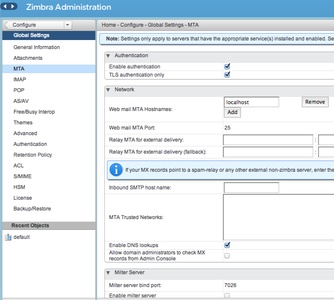
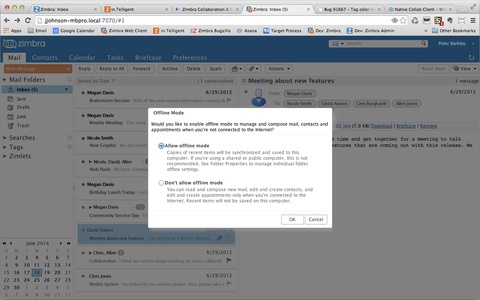
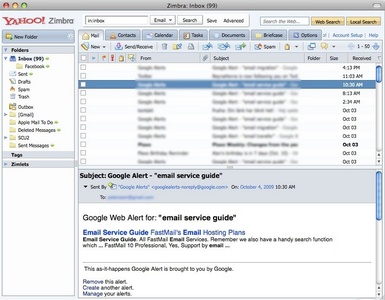
Zimbra Desktop screenshots
How to download and install Zimbra Desktop on Mac
- Open the Zimbra Desktop download page on APPDIR.
- Choose the official publisher or store link and download the DMG file.
- Open the downloaded file and move the app to Applications. On first launch, confirm it in System Settings › Privacy & Security if macOS asks.
- Review the requested permissions and only grant what you need.
Is Zimbra Desktop safe?
APPDIR lists metadata and links to official sources only; we never re-host or modify installer files. Compare the SHA-256 hash above with the file you download to confirm it is untouched. The content rating is All ages. See our security policy for how listings are checked.
Alternatives to Zimbra Desktop

Zelda Classic
Zimbra Desktop FAQ
What does Zimbra Desktop do?
It is a desktop client that combines email, a calendar with an event log, a to-do list, a memo pad and contact information in one application.
Is Zimbra Desktop free?
Yes. It is proprietary software offered at no cost, so there is no purchase price to download and use it.
Is Zimbra Desktop safe, and what permissions does it need?
The listing states that permissions are not applicable. As with any email client, it handles personal correspondence and account data, so download it from a trusted source and review its settings after installation.
What are the system requirements?
The download is a DMG file of about 185.51 MB for Mac, version 4.39.0, released September 18, 2024. The provided details do not list specific macOS versions or hardware requirements, so check the developer's information before installing.
Are there alternatives to Zimbra Desktop?
Other desktop launchers and gaming-related tools sometimes mentioned alongside it include Steam, Epic Games Launcher, TLauncher, PS Remote Play and Blockbench, though these serve different purposes. For email and calendar work, compare dedicated mail and scheduling apps as well.